
Technical SEO Audit Checklist: 25 Fixes That Can Double Your Organic Traffic
- Team BrandBear
- Jun 3
- 9 min read

Last year a founder came to us, frustrated, asking why nobody was finding their website.
The brand looked great. Real services, a real team, a clean idea. But the site itself was struggling. On mobile it took more than ten seconds to load the main content, the layout wasn't even properly responsive, and Google was barely sending any traffic. AI tools didn't know the company existed at all.
That client was StarLED Display. And their situation is the perfect example of why technical SEO matters. The stuff that's costing you traffic is almost never the stuff you notice from the outside. It's buried in load times, render paths, and code that crawlers can't read.
So our team ran a full technical audit. Then we worked through the list.
This is that list. Twenty-five fixes, in the order we'd actually tackle them, with the real client situations that taught us why each one matters. Some are five-minute changes. A few take a developer. All of them compound.
Here's how it breaks down.
First, why "technical SEO" still decides everything in 2026
Here's the thing most people get backwards. Google's job is to find your page, read it, trust it, and decide it answers a question better than the next site. Technical SEO is just clearing the path for all four of those steps.
And the bar keeps rising. Google rolled out the May 2026 Core Update on May 21, the second broad core update of the year. The Helpful Content system isn't a separate event anymore either. Since March 2024 it's been baked into the core ranking system as a continuous, site-wide signal, which means one batch of thin or unhelpful pages can drag down your whole site.
There's a second reason this matters more than it used to. AI answers. Ahrefs found that AI Overviews cut click-through rates on top-ranking Google results by 58%. If you're not the source the AI pulls from, you're invisible twice over.
So technical SEO is no longer just about Google. It's about whether any engine, human or machine, can find and trust you.
Now the fixes.
Group A: Can Google even find you?
1. Get your robots.txt right, and let the AI bots in. First make sure you aren't accidentally blocking real pages. Then explicitly allow the AI crawlers (GPTBot, ClaudeBot, PerplexityBot, Google-Extended) so AI engines can actually read you.
2. Publish an XML sitemap and submit it. One legal firm we audited had no sitemap at all, so Google was crawling blind. List every real URL with lastmod dates, then submit it in Search Console and Bing.
3. Set up Google Search Console and Bing Webmaster Tools. You can't fix what you can't see. Bing also powers Copilot and roughly 6% of searches, so don't skip it.
4. Hunt down server errors and broken pages. Another client's contact form had been returning a 500 error for months. Visitors literally could not reach the business. Fix every 500 and dead 404 before anything else.
5. Check what's actually indexed. Dutch Technology Frontiers had only 8 of their 18 pages indexed, and two of their highest-value service pages weren't in Google at all. Run a site: search and the GSC coverage report to find your invisible pages.
Group B: Can Google read you?
This is where a lot of modern sites quietly fail, and Dutch Technology Frontiers was a textbook case. It was a client-side React app.
That means the first thing every crawler saw was an empty shell. A blank <div> with no content, no links, no headings. Google can eventually run the JavaScript and fill it in, but AI crawlers and social bots can't. They just see nothing.
6. Server-side render JavaScript-heavy sites. SSR was the single biggest lever for DTF.
It meant Google, Bing, AI engines, and LinkedIn all saw real content instantly instead of an empty page. Google's own documentation still recommends server-side or pre-rendering because not all bots can run JavaScript.
7. Put real internal links in your raw HTML. If your links only appear after JavaScript runs, Google's first crawl hits a dead end and can't discover your other pages. Internal links are how crawlers map and rank a site.
8. Kill thin pages and fix your text-to-HTML ratio. One client had a 90-word page with an "Under Construction" heading sitting indexed in Google. Another had lorem ipsum placeholder text live on the homepage. Merge, expand, or remove anything thin.
Group C: On-page signals that still decide rankings
None of this is new. It's still where a shocking number of sites lose easy ground.
9. Write a unique, keyword-led title tag for every page. One firm used the identical title on all 10 pages, typo and all ("Desgin" instead of "Design"). Google can't tell those pages apart. Every page needs its own title built around what that page is actually about.
10. Write a unique meta description, 150 to 160 characters. Same firm, same description copy-pasted everywhere, well over 300 characters of run-on text. Write one per page, and give people a reason to click.
11. Fix your heading hierarchy. One H1 per page, descriptive, with logical H2s and H3s beneath it. We kept finding pages that used the brand name as the H1 or skipped the H1 completely.
12. Add a canonical tag to every page. This was missing on 100% of pages for two separate clients. Without it, every UTM link and URL variant splits your ranking power across duplicate versions of the same page.
13. Clean up your URL structure. Short, lowercase, descriptive, no stray capital letters. One page lived at a URL with a capital "P" buried in the middle, which quietly creates case-sensitivity bugs.
14. Fix Open Graph and Twitter cards. DTF's og:url pointed at a completely different domain, so every LinkedIn share was sending authority to a site they don't even own. For a B2B company that lives on LinkedIn, that's traffic bleeding out daily. Set your og: tags and twitter:card per page, and triple-check the URL.
Group D: Structured data, your ticket into rich results and AI answers
Schema is how you stop making Google guess. You hand it the facts in a format it can't misread.
15. Add Organization and WebSite schema. This tells Google who you are as an entity. We hardcoded it into DTF's static HTML so it worked even before SSR shipped.
16. Add Service or LocalBusiness schema. Service pages and local businesses get richer treatment when you spell out exactly what you offer and where.
17. Add BreadcrumbList schema. Small effort, cleaner SERP display, and it helps crawlers understand your site's hierarchy.
18. Add FAQPage schema. This is one of the fastest paths into People Also Ask and AI Overviews. If you have genuine FAQs, mark them up.
19. Add Person schema for your authors. For anything in a money, legal, or health niche, a named and credentialed author is an E-E-A-T signal that both Google and AI engines look for.
Group E: Core Web Vitals, where StarLED Display's story really lands
Now back to StarLED Display, because this is where the biggest change happened.
When the site came to us, it was slow in the way that quietly kills a business. On mobile, the main content took more than ten seconds to appear. Google's threshold for a "good" LCP is under 2.5 seconds, so Starled Display was four times over the line. Worse, the mobile version wasn't even properly responsive, so half the visitors were landing on a page that was slow and awkward to use at the same time.
Most people on a phone don't wait ten seconds. They leave.
So Core Web Vitals became a priority. Here's the scoreboard Google actually uses. INP replaced FID in 2024, and "good" means under 200 milliseconds, the same way LCP wants under 2.5 seconds and CLS wants under 0.1. INP is the metric most sites fail in 2026.

Metric | What it measures | "Good" target | StarLED before | StarLED after |
LCP | Loading speed | under 2.5s | 10s+ on mobile | 0.5s |
CLS | Visual stability | under 0.1 | unstable layout | 0.00 |
Mobile | Responsive design | fully responsive | broken | fixed |
One thing to know: Google judges these on real-visitor field data at the 75th percentile over a rolling 28-day window, not on a single lab test. So the lab score is a clue, not the final verdict.
The cause behind StarLED's slow load was heavy, unoptimized JavaScript and images, plus a mobile layout that was never built to flex. So that's what we attacked.
20. Cut JavaScript execution time. Audit and remove unused scripts (old plugins, dead tracking tags), defer or async anything non-critical, and code-split large bundles so the browser isn't choking on one giant file. This was a big part of dragging StarLED's load time down.
21. Eliminate render-blocking CSS and JS. Inline the critical CSS for above-the-fold content, load the rest asynchronously, and push non-essential scripts to load with defer.
22. Serve next-gen, right-sized images. Convert everything to WebP or AVIF, add responsive srcset, compress losslessly, and lazy-load anything below the fold. Right-sizing images for mobile was a major lever in fixing StarLED's load time and its responsiveness at the same time.
23. Fix caching, CDN, and server response time. Aim for a TTFB under 0.3 seconds. Full-page caching, a CDN, Brotli compression, and HTTP/3 close that gap fast.
24. Preload the few things that matter. Preload your fonts and hero image, and set font-display: swap so text shows instantly instead of waiting on a font file.
The payoff: StarLED went from over ten seconds to a 1.3-second LCP, a rock-steady 0.02 CLS, and a mobile experience that finally worked the way visitors expect.
Group F: The AI-search layer
This is the newest piece, and it's where most checklist blogs get it flat wrong.
25. Make your content easy to cite. Lead each section with a direct answer in the first 40 to 60 words. Write self-contained passages an AI can lift cleanly. Add a named author and a visible publish or update date.
Now the nuance everyone misses. In its first official AI-search guide, published May 15, 2026, Google said you can ignore "hacks" like content-chunking and creating an llms.txt file, at least for Google Search itself. Solid SEO plus content only you can write is what wins inside Google.

But that's Google. Other engines are a different story. An llms.txt file and clean, citable
passages still help with ChatGPT, Claude, and Perplexity, which is exactly why we added one for our clients. So do the foundation for Google, and add the AI-specific layer for everyone else.
So what actually happened with StarLED?
We worked through this list. Not in a week, and not all at once. Crawlability first, then rendering, then on-page, then schema, then speed, then the AI layer.
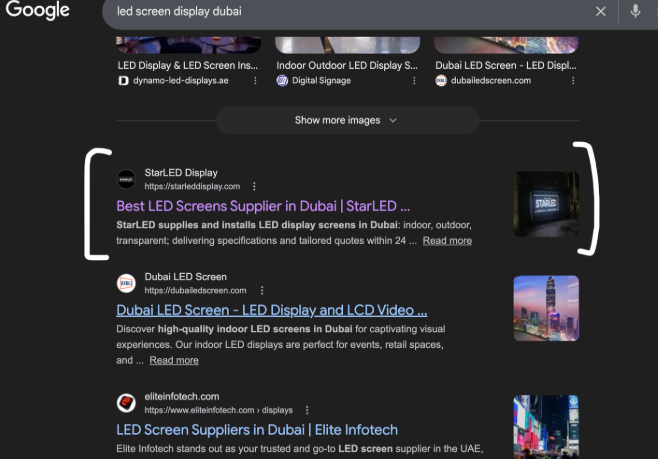
The site that took more than ten seconds to load on mobile now paints its main content in 1.3 seconds, stays visually stable, and works properly on a phone. And the results followed where it counts. StarLED's rankings climbed. They started appearing inside Google's AI Overviews and AI Mode. And LLMs began citing them as a source in answers, which a year earlier would have been impossible because the engines couldn't even read the page.
We have the Search Console screenshots and the AI citation captures to show for it.
Could this double your organic traffic? It depends on where you're starting and how broken things are. The "doubling" isn't magic. It's what happens when you stop leaking traffic through a dozen technical cracks at the same time. When a site starts out as rough as StarLED's did, that compounding effect is very real.
How to use this checklist tomorrow
Don't try to do all 25 at once. Start with Group A and find out if Google can even see your important pages. Then ask whether it can read them. Fix the cheap, high-impact stuff (titles, descriptions, canonicals, broken pages) while a developer plans the bigger lifts like SSR and Core Web Vitals.
Google says to judge your own work by "Who, How, and Why." Who made this, how was it made, and why does it exist, with the answer always being "to help a real person," not "to rank." Run your site through that lens after the technical fixes, and you're aligned with where search is going.
Because the sites that get found in the next few years won't be the ones that gamed an algorithm. They'll be the ones that were easy to find, easy to read, and worth trusting. Build that, and both Google and the AI engines will keep sending people your way.
Frequently asked questions
How long before a technical SEO audit shows results? Quick wins like fixing titles or a broken page can move things in days. Bigger changes ride on Google's update cycle, and core updates take roughly two weeks to roll out. If a Helpful Content issue was holding you back, recovery can take longer, sometimes months.
Do I really need an llms.txt file? Not for Google Search. Google says you can skip it. It still helps with other AI engines like ChatGPT, Claude, and Perplexity, so we treat it as an optional bonus layer, never a substitute for real SEO.
What's the single most important fix? For JavaScript-heavy sites, server-side rendering, because nothing else works if crawlers see a blank page. For a slow site, it's Core Web Vitals, especially load time on mobile. For everyone else, it's making sure your money pages are indexed and have unique, well-written titles.
Is page speed still a ranking factor in 2026? Yes, through Core Web Vitals (LCP, INP, CLS). It usually acts as a tiebreaker when content and relevance are close, but as StarLED showed, a ten-second mobile load is well past "tiebreaker" and into "actively losing visitors."
Want this run on your site?
This is the exact audit process the BrandBear Marketing team runs for clients like StarLED Display and Dutch Technology Frontiers. If your site looks fine but isn't pulling the traffic it should, that's usually a sign the invisible layer needs work. Get in touch and we'll take a look.
About the author
Sohail Ahmed is an SEO Expert at BrandBear Marketing, where he runs technical SEO audits and search strategy for B2B and service businesses. He spends his time in the unglamorous side of search, the crawl logs, render paths, schema, and Core Web Vitals that quietly decide who ranks and who gets cited by AI. The fixes in this guide come straight from real audits the BrandBear Marketing team has run, including work for Dutch Technology Frontiers and StarLED Display. Connect with Sohail on LinkedIn.

Comments